Profiles
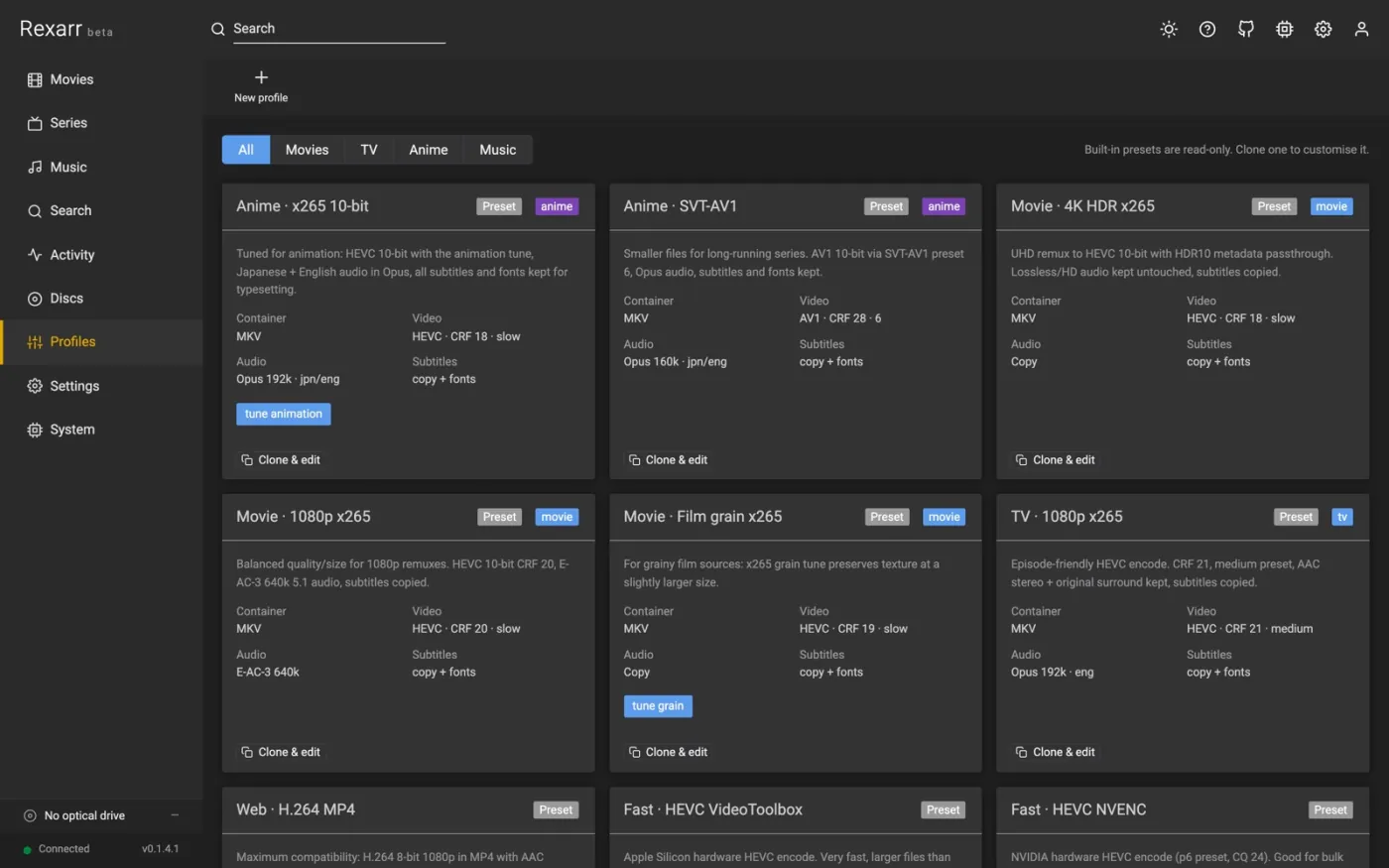
A profile is a complete description of one encode: container, video, audio, subtitles and output handling. Every job uses exactly one profile. The built-in presets cannot be edited — clone one and change the copy.
Video
| Field | What it does |
|---|---|
| Encoder | x264, x265, SVT-AV1, libaom-AV1, VP9, NVENC / QuickSync / VAAPI / AMF / VideoToolbox / RKMPP / V4L2 variants, or copy (no video re-encode) |
| Quality | CRF for x264 / x265 / SVT-AV1 / libaom / VP9; translated to CQ, QP, global_quality or -q:v for hardware encoders |
| Preset | Software: ultrafast…placebo (x264 / x265) or 0–13 (SVT-AV1). Hardware: p1–p7 / speed levels |
| Tune | none, animation, film, grain, fastdecode, zerolatency |
| Pixel format | auto, yuv420p (8-bit), yuv420p10le / p010le (10-bit), nv12 |
| Max height | downscale so the height fits (0 keeps the source resolution) |
| HDR passthrough | keep HDR10 colour metadata when the source is HDR |
| Bitrate | kbps, for encoders and modes that are bitrate-based (0 = quality based) |
| Extra args | raw ffmpeg arguments appended after the video options |
| Software only (CPU) | ignore the hardware acceleration set in Settings for this profile |
Audio
| Field | What it does |
|---|---|
| Encoder | copy, AAC, Opus, E-AC-3, AC-3, FLAC, TrueHD (plus LAME MP3, Vorbis, WavPack, Monkey's Audio for music profiles) |
| Bitrate / channels | kbps per stream; channels 0 (keep), 2, 6 or 8 |
| Languages | ISO 639-2 codes to keep, e.g. jpn, eng. Empty keeps all |
| Tracks per language | Keep them all, or one of them: the best, the smallest, or the first in the file |
| Drop commentary | skip tracks whose title says commentary |
A disc almost always carries a language more than once — DTS-HD MA 5.1 beside Dolby Digital 2.0, or the same mix in two codecs — and Tracks per language is how to be rid of the extras. Best and smallest rank a track the way disc ripping does: codec first (TrueHD, DTS-HD MA, LPCM, FLAC, then DTS over Dolby Digital), then channels, then bitrate; a commentary track is never the pick either way. First is whichever the file happens to list first, which is what Rexarr did before this was a choice.
Dropping a track here happens at the encode, so it works on files you already have as much as on a fresh rip, and the size estimate counts it. For a disc you are about to rip, Settings → Disc ripping → Best audio per language does the same thing earlier, and leaves less to carry about.
Music profiles add VBR quality, maximum sample rate, bit depth, FLAC compression level, ReplayGain, embedded cover and Keep MQA intact — see Music.
Subtitles
Copy everything, copy text only, burn in (choose the language, optionally preferring forced tracks), or none. Keep fonts copies MKV font attachments, which anime subtitles need.
Picture subtitles
A DVD, a Blu-ray and a DVB recording carry their subtitles as pictures — dvd_subtitle, hdmv_pgs_subtitle,
dvb_subtitle — not as words. Nothing in FFmpeg turns a picture into text, so they cannot be converted by
changing the codec, and MP4 and WebM, which cannot hold them at all, simply lose them.
Picture subtitles decides what happens to them:
| Keep as pictures | copy them as they are, where the container can carry them. The default |
| Read into text (OCR) | read them with Tesseract and keep the text instead |
| Read into text, keep the pictures too | both, which an MKV has room for |
Reading them turns a disc's subtitles into real SRT: searchable, stylable, and small enough that an MP4 or a
WebM keeps them rather than dropping them. It needs Tesseract and a language
model for each subtitle language — brew install tesseract, apt install tesseract-ocr tesseract-ocr-eng, or
the Windows installer. The System page says whether it is there and which models it has, and warns if a profile
asks for OCR without it.
Settings → Tesseract is the switch for the whole of Rexarr, and holds the path (empty to find it where it usually lives). Turned off, every profile's choice here is ignored and picture subtitles are copied as they are — the job log and the command preview say so rather than going quiet.
It happens before the encode, since it cannot happen inside it, and it is slow: minutes for a feature, written into the job log as it goes ("412 lines read from 1,074 pictures in 96s"). How well it reads depends on the disc — a clean white-on-black DVD font is close to perfect, a stylised one is not — so read the result before you delete the source. A track that cannot be read, or a language Tesseract has no model for, is noted in the log and left as pictures; it never fails the encode.
Each track keeps its own language and its forced flag, and is named English · OCR so it is obvious where it came from.
Output
| Field | What it does |
|---|---|
| Directory | empty = next to the source file |
| Suffix | appended to the file name before the extension |
| Replace original | delete the source after a successful encode |
| Rescan in *arr | ask Radarr / Sonarr to rescan when the encode finishes |
| Rename for the encode | rewrite release tokens in the name so it no longer claims to be a remux |
| Write clean metadata | file title, track titles, default track, no stale source tags |
Built-in presets
| Video | Music |
|---|---|
| Anime · x265 10-bit | Music · Keep as downloaded |
| Anime · SVT-AV1 | Music · FLAC (lossless, keeps MQA) |
| Movie · 4K HDR x265 | Music · FLAC 16/44.1 (CD quality) |
| Movie · 1080p x265 | Music · WavPack (lossless) |
| Movie · Film grain x265 | Music · MP3 V0 (LAME) |
| TV · 1080p x265 | Music · MP3 320 (LAME) |
| Web · H.264 MP4 | Music · Opus 160k |
| Fast · HEVC VideoToolbox | Music · Ogg Vorbis q6 |
| Fast · HEVC NVENC | |
| Remux · Keep video, Opus audio | |
| Remux · Keep video, FLAC audio |
Only open-source audio encoders are offered (no FDK-AAC, no Apple / Nero AAC); old profiles that used libfdk_aac
fall back to FFmpeg's native AAC with a warning.
Smart profiles
A smart profile is a profile. It has its own settings and encodes with them — there is no second profile behind it. What makes it smart is that some of those settings are decided from the file in front of it, which is the only way to answer the questions worth asking: whether a disc's lossless track is stereo or 7.1, whether its audio carries Atmos or DTS:X, whether what you are encoding is animation.
It can be chosen anywhere a profile can — the per-kind defaults in Settings, a rip's profile on the Discs page, auto transcode. The decision is made per file, so each episode of a series is judged on its own.
How it decides
Every encode starts from the profile's own settings. Each branch is then checked in order, and every branch that fits applies its changes — a later one wins where two touch the same setting. So:
Start from   HEVC, CRF 20, audio copied, subtitles copied
Branch 1     if the genre is Animation        → tune animation, CRF 18
Branch 2     if this is 2160p and HDR         → 10-bit, keep HDR metadata
An animated UHD disc takes both. A live-action 1080p one takes neither and is encoded with the settings at the top. There is no fallback branch to write, because the settings you start from are the fallback.
If nothing would be re-encoded — video copied, audio copied, subtitles copied, same container — Rexarr queues no encode at all and leaves the file alone. That is what "keep TrueHD" looks like: start from audio copied, and only change it for the discs you want changed.
The canvas
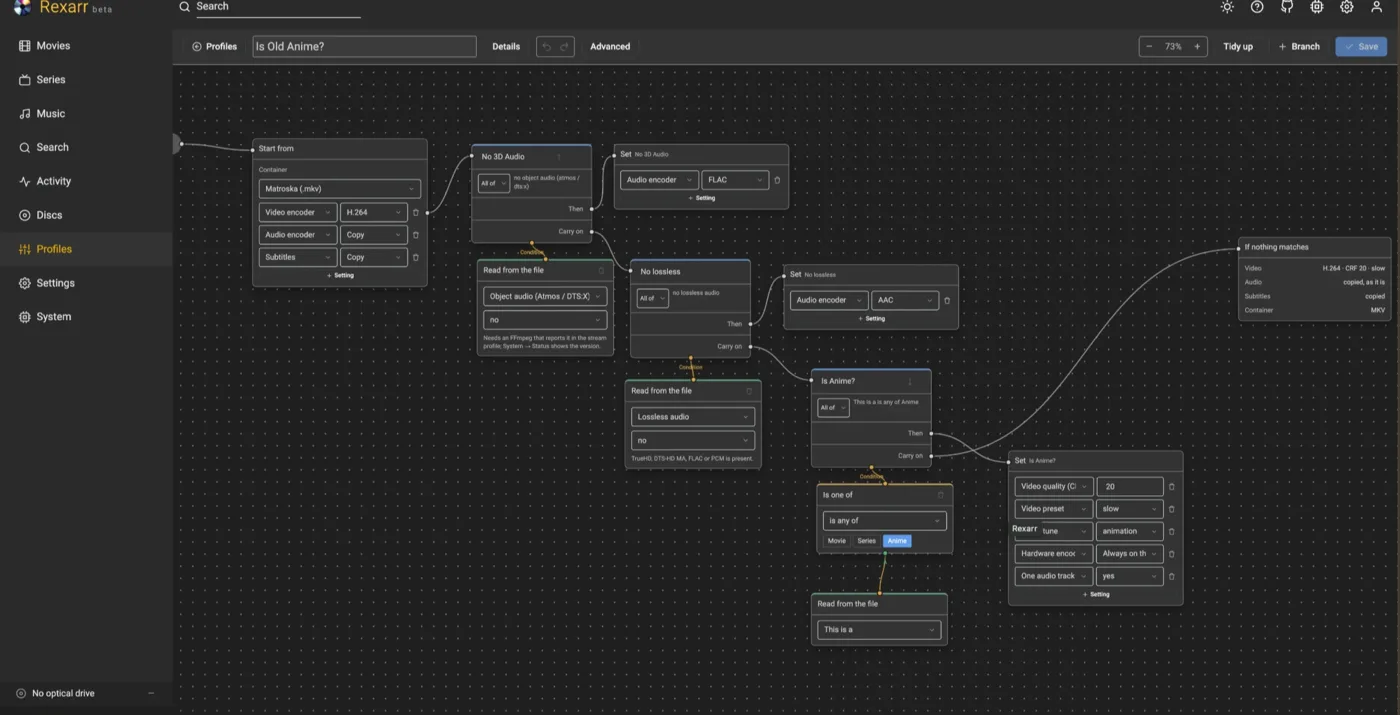
Profiles → a smart profile → Edit opens it as a graph, filling the window beside the sidebar. Start from holds the settings every encode begins with. A Branch asks a question and has a Then, which goes to a Set node listing what it changes, and a Carry on, which continues to the next branch. A branch's Condition comes up from the nodes below it — a Comparison fed by a Read from the file, or a plain read for a yes/no question, gathered by an All of when a branch asks more than one thing. At the end, If nothing matches shows what a file that fits no branch is encoded with.
Everything is edited in the node itself, and a branch says what it asks in its own body, so the graph still reads when it is zoomed out. Drag nodes anywhere — where they sit is saved with the profile, Tidy up puts them back — drag the background to pan, scroll or use the zoom control to resize, and the percentage button frames the lot.
Hold shift and drag to draw a box over the canvas: every node it touches is selected, and dragging any one of them moves the whole group. Shift-click a node on its own to add it to the selection or take it out again. A click on the background, or Esc, drops the selection; the bar says how many are held. Dragging the background without shift pans, as before. Details holds the description and what the profile is for, and Advanced adds the node menu and cables — see below. Edits are kept until you press Save; an Unsaved mark appears in the bar and leaving the page asks first.
↶ ↷ in the bar undo and redo, as do ⌘Z and ⇧⌘Z (Ctrl on Windows and Linux). They cover everything on the canvas — a value typed, a node added or taken away, a cable run or pulled, a node dragged — and a run of small changes is one step, so undoing a drag puts the node back where it started rather than walking it there.
The wires are drawn from the chain rather than dragged by hand: the order of the branches is what a smart profile is, and the ↑ ↓ on a branch's header changes it.
Advanced
Nothing is ever hidden. A branch can ask about 27 things and change 28, and every one of them is in the dropdown, sorted under a heading — Audio, Video, Subtitles, Source, What it is on the asking side, Video, Audio, Subtitles, Output on the changing side — so a long list is still something you can read down.
Advanced in the bar is about the canvas rather than the dropdowns. On, it adds:
A node menu. + Node drops a node on the canvas on its own: a Branch (which lands at the end of the chain, like the ordinary + Branch button), a Comparison — a number read off the file, measured against one of yours — or a Yes / no. A comparison arrives with its Read from the file already attached, so the field is yours to pick straight away.
Cables. Every condition node grows a ⌁ button. On a condition that is wired to a branch it takes the cable off: the node stays exactly where it is, drawn with a dashed border, and the branch simply stops asking it. On a node with no cable it picks the cable up — the bar says Cable in hand, the branches' condition ports light up and say Plug in here, and clicking one makes that condition one of the branch's questions. Esc, or the bar's own hint, puts the cable down again.
A node with no cable decides nothing. It is not a condition that is switched off and it is not a branch that never fires — it is simply not wired to anything, and the profile encodes as if it were not there. It is saved with the profile, where it sat and all, so a question you are still thinking about survives a reload.
To be rid of one for good, use its bin.
Advanced is the same switch the Settings pages use, remembered the same way, and it changes nothing about how a profile encodes.
What a branch can ask about
| Audio | channels (the widest track in the file), codec, object audio (Atmos / DTS:X), whether anything lossless is present, languages carried, whether there is a commentary track, how many tracks, highest declared bitrate |
| Video | height, width, codec, HDR, Dolby Vision, bit depth, frame rate, whether it is interlaced |
| Subtitles | how many, languages, whether any are forced, whether any are text rather than bitmap |
| Source | running time, file size, bitrate, container |
| What it is | movie / series / anime, genres, and the year |
What it is comes from Radarr or Sonarr when they have the title. For anything they do not — a local file, a disc being ripped, something queued by hand — it comes from OMDb when that is switched on, which is what makes if it is animation, use the animation tune work outside the *arr apps. Either way the lookup only happens when a branch actually asks, so a profile that never mentions genre costs nothing.
A branch wants all of its conditions by default; switch it to any of and one is enough. It can be given a name, which is what the job log calls it, and switched off — the branch and its wiring stay where they are and it is simply skipped, which is how you try something without losing it.
Object audio is read from the stream profile FFmpeg reports — Dolby TrueHD + Dolby Atmos,
Dolby Digital Plus + Dolby Atmos, DTS-HD MA + DTS:X, DTS-HD MA + DTS:X IMAX. Nothing else in the file says
so: a 7.1 TrueHD track is not necessarily Atmos, and no channel count settles it. An FFmpeg too old to name it
never reports it, in which case the condition is simply never true — System → Status shows the version. Every
decision writes the profiles it saw into the job log, so you can tell the two apart.
Genres come from Radarr or Sonarr, lower-cased, and are only looked up when a branch actually asks about them, so a smart profile that never mentions genre costs no extra request.
What a branch can change
| Video | encoder, CRF, preset, tune, downscale height, pixel format, HDR passthrough, bitrate, whether to force the CPU, extra ffmpeg arguments |
| Audio | encoder, bitrate, channels, which languages to keep, how many tracks per language, whether commentary is dropped |
| Subtitles | mode, which languages to keep, which language to burn in, forced only, font attachments, picture subtitles |
| File | container, file name suffix, output folder, replace the original, rename from the profile tokens, clean metadata, tell Radarr / Sonarr |
Anything a branch does not touch stays as the profile's own settings left it. Start from takes the same list, so whatever a branch can change, a profile can also simply be.
The two that ship with it
- Smart · Lossless audio, the right way round — video and audio copied, except that a lossless stereo track becomes FLAC: the same samples in less space. Surround and object audio are left exactly as they are, which means no encode is queued for them at all.
- Smart · x265, and animation knows itself — HEVC CRF 20 for everything, with animation (by genre, or a series Sonarr calls anime) getting the animation tune and CRF 18, since flat colour and sharp lines fall apart at settings that suit film grain; UHD HDR adds 10-bit and HDR passthrough.
Both are read-only. Clone one to change it.
Command preview
The profile editor shows the exact ffmpeg command the profile produces, either against a sample UHD remux or against a real file on disk, together with the output file name it would write. Use it before you run a 4-hour encode.
It also says what the video will come out at — Video ≈ 9.6 Mbps · source 67 Mbps overall — because a CRF is not a number anyone can read a bitrate off, and that is usually the question being asked while one is being chosen. The same line appears under Preview command in the transcode dialog, where it is measured against the file you are about to encode. The figure is an estimate for a quality-mode encode and exact where the profile sets a bitrate or copies the stream.
Output names and metadata
An encoded remux is not a remux any more, so by default (profile → Output → Rename for the encode) the release tokens in the file name are rewritten to describe the result. Radarr / Sonarr then report the real quality after the rescan instead of Remux:
| Source | Encode (x265 10-bit, Opus) |
|---|---|
Blade Runner 2049 (2017) Remux-2160p.mkv |
Blade Runner 2049 (2017) Bluray-2160p.mkv (or Bluray-1080p when downscaled) |
Frieren - S01E05 - Phantoms of the Dead - Bluray-1080p Remux.mkv |
Frieren - S01E05 - Phantoms of the Dead - Bluray-1080p.mkv |
Movie.2017.2160p.UHD.BluRay.REMUX.DV.HDR.HEVC.TrueHD.Atmos.7.1-GRP.mkv |
Movie.2017.2160p.UHD.BluRay.HDR.10bit.x265.Opus.7.1-GRP.mkv |
Only quality, resolution, codec, audio, HDR (Dolby Vision is dropped by an encode, HDR10 kept) and bit-depth tokens already in the name change; titles, years, ids and release groups stay.
Write clean metadata sets the file title (Movie (Year) / Show - S01E05 - Title), names tracks
(2160p HEVC 10-bit HDR10, English · Opus 5.1, subtitle language / Forced / SDH), marks the first audio track
default, removes stale source stream tags and adds a comment describing the encode.
How a profile becomes an ffmpeg command
- Streams are selected explicitly by index from
ffprobeoutput: one video stream, audio streams filtered by language (with commentary dropped), subtitles filtered by language / type, font attachments when the container is MKV. - Quality is mapped per encoder family:
-crffor x264 / x265 / SVT-AV1 / libaom / VP9,-cq+-rc vbrfor NVENC,-global_qualityfor QuickSync,-qpfor VAAPI / AMF,-q:vfor VideoToolbox. - HDR sources keep colour primaries / transfer / matrix flags and, for x265, mastering-display and content-light metadata. Dolby Vision RPU layers are dropped (HDR10 base layer kept) with a warning.
- MP4 / MOV get
-movflags +faststart,hvc1tagging for HEVC, text subtitles asmov_text; bitmap subtitles and incompatible audio codecs are dropped or re-encoded with a warning in the log. - Output goes to
<name>.<ext>next to the source (or your directory / suffix), written as a.rexarr-parttemp file and renamed on success. With Replace original the source is deleted and Radarr / Sonarr are asked to rescan.